
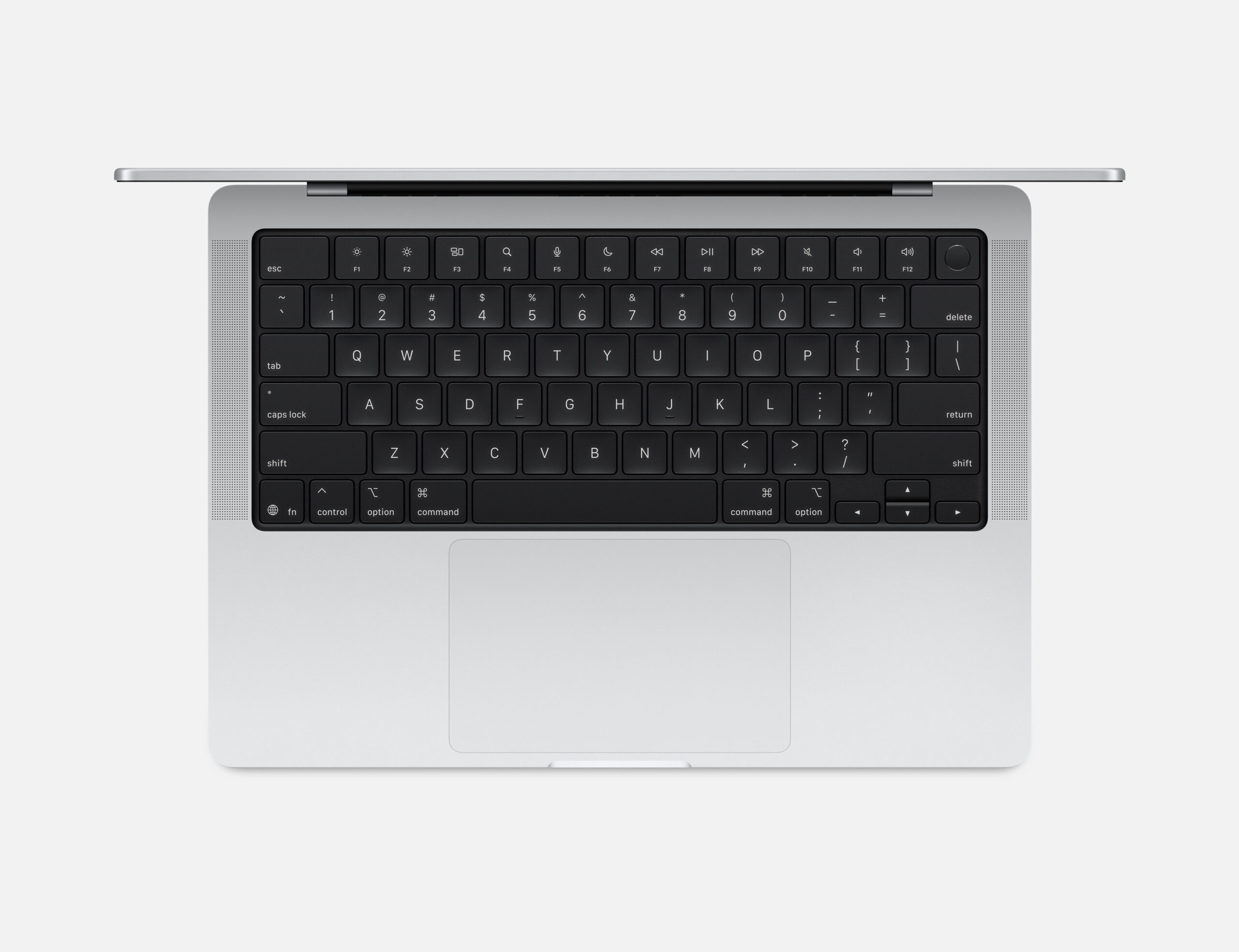
If you are walking into an Apple Store this holiday season, the new MacBook Pro 14-inch with the M5 chip presents a confusing proposition. On the shelf, it looks identical to the M3 and M4 models that came before it. It has the same chassis, the same screen notch, and the same port layout.
However, after spending two weeks using this machine as my daily driver—replacing my maxed-out M1 Max studio machine for everything from 4K video editing to local AI development—I can tell you that looks are deceiving. This isn’t just a spec bump; it is a fundamental shift in how Apple silicon handles the modern workload.
This is the review of the MacBook Pro M5, a laptop that proves you don’t need a redesign to feel like a completely new machine.
Advertising Disclosure
1. Design & Build: If It Ain’t Broke…
The Unibody Standard
Let’s get the obvious out of the way: Apple did not change the industrial design. We are still looking at the squared-off, utilitarian aluminum unibody that debuted a few years ago. And honestly? I’m fine with that.
In a market flooded with creaky plastic hinges and flexy chassis, the MacBook Pro remains a tank. There is zero deck flex. The hinge is perfectly weighted—you can open it with one finger, yet it stays rock solid when you’re typing furiously. It feels dense, premium, and justifies its price tag the moment you pick it up.

*Some images are sourced from https://www.apple.com/
Space Black: The Durability Test
I have been testing the Space Black model, and I know the question on everyone’s mind: Does it still smudge? Two years ago, the first Space Black models were fingerprint magnets. Apple claims to have improved the anodization seal this year. In my testing, which involved eating greasy takeout while working late nights (don’t judge me), the resistance to oils is noticeably better. It’s not immune—you will still see some smudges after a long day—but they wipe off with a simple microfiber cloth much easier than before. It retains that stealthy, matte look that makes the Silver model look a bit dated by comparison.
The Port Situation: A Missed Opportunity?
Here lies my first gripe. The chassis features an SDXC card slot, an HDMI port, a 3.5mm headphone jack, MagSafe 3, and three Thunderbolt/USB-C ports. The problem? The base M5 model is stuck on Thunderbolt 4, while the higher-end Pro and Max chips have moved on to Thunderbolt 5. For 95% of users, 40Gb/s is plenty. But if you are a creator offloading terabytes of footage from high-speed SSD raids, that bottleneck is real. Apple clearly uses this to segment the market, pushing “real” pros to the more expensive tiers.
2. The Display: Liquid Retina XDR Still Reigns Supreme
Mini-LED Magic
The 14.2-inch Liquid Retina XDR display remains the best screen you can get on a laptop, period. While competitors are moving to OLED, Apple’s Mini-LED implementation still holds the advantage in brightness. Sustaining 1,000 nits full-screen brightness is a game-changer for working outdoors. I spent an afternoon writing at a sun-drenched cafe patio, and not once did I have to squint. When watching HDR content (like Foundation on Apple TV+), the 1,600 nits peak brightness makes specular highlights pop in a way that makes standard IPS screens look broken.

The Nano-Texture Option
My review unit came equipped with the new Nano-texture glass option. Historically reserved for the expensive Pro Display XDR, this matte finish is finally available on the laptop line. It is not just a matte film; the glass is etched at a nanometer level to scatter light. The glare reduction is phenomenal. Overhead office lights that usually turn glossy screens into mirrors simply diffuse into soft, ignored blobs of light. However, there is a trade-off. The “pop” and absolute contrast of the glossy screen are slightly diminished. If you are a colorist who needs absolute black levels, stick to the standard glass. If you work in unpredictable lighting conditions (airports, bright offices), the Nano-texture is worth every penny of the upgrade fee.
3. The M5 Chip: A Single-Core Monster
This is why you are here. The M5 chip.
The “Snappiness” Factor
Benchmarks tell one story, but “feel” tells another. The M5 features Apple’s newest CPU architecture, and the single-core performance is frankly ridiculous. In Geekbench 6, we are seeing scores north of 4,200. What does that mean for you? It means the operating system feels frictionless. Apps like Photoshop, Slack, or heavy Excel sheets don’t just open; they appear. The latency between clicking a mouse and an action happening has been reduced to almost zero. It makes the laptop feel faster than even my desktop workstation for mundane tasks.
The Thermal Reality of the Single Fan
The base M5 MacBook Pro 14-inch uses a single cooling fan. The M5 Pro and Max models use two. For 90% of my testing, the fan never turned on. The efficiency of the M5 is unparalleled. However, I pushed it. I ran a 30-minute Cinebench 2024 stress test followed by a 4K export in Premiere Pro. Around the 15-minute mark, the single fan spun up. It’s a “whoosh” sound, not a high-pitched whine, so it’s not annoying. I did notice some thermal throttling on the performance cores after sustained loads, dropping about 10-15% in clock speed to keep temps in check. If your workflow involves 24/7 rendering, you need the M5 Pro. For bursty workloads—like compiling code, editing photos, or short video edits—the cooling is perfectly adequate.
4. The AI PC Era: Real-World Testing
Apple kept saying “Apple Intelligence” during the keynote. Usually, I roll my eyes at marketing buzzwords, but the hardware changes here are significant. The M5 puts a Neural Accelerator directly into the GPU cores, alongside the standard Neural Engine.
Local LLMs and Privacy
I installed LM Studio to run Llama-3, a large language model, locally on the device. I allocated 12GB of the system’s 16GB RAM to the model. The token generation speed was startling. I was getting responses faster than I could read them. Because the memory bandwidth has been bumped to 153GB/s, the bottleneck of loading weights into the processor is largely gone. For developers wanting to build AI apps without paying for cloud API credits (or risking privacy leaks), this machine is a portable dream.
Adobe Lightroom Denoise
This is my standard “is it fast?” test. Using the AI Denoise feature on a 45MP RAW file from a Canon R5.
- M1 MacBook Pro: ~35 seconds
- M5 MacBook Pro: ~9 seconds That is not a typo. The GPU accelerators chew through matrix math operations. If you are a wedding photographer processing thousands of photos, this machine literally buys you hours of your life back every week.
5. Gaming: Yes, Gaming.
I never thought I’d write a section about gaming in a MacBook review that was positive, but here we are.
Cyberpunk 2077 & Ray Tracing
Thanks to the Game Porting Toolkit and CrossOver, I got Cyberpunk 2077 running. The M5 supports hardware-accelerated Ray Tracing (Gen 3). At 1080p High settings, with FSR enabled, I was getting a stable 45-55 FPS. Is it competing with a dedicated RTX 4080 laptop? No. But playing a AAA title with ray tracing enabled on a thin-and-light Mac, on battery power, without the fans sounding like a jet engine, is a technical marvel. Games native to Metal, like Resident Evil Village, run flawlessly at high resolutions. The “Macs can’t game” narrative is officially dying.
6. Battery Life: The 24-Hour Myth?
Apple claims “up to 24 hours” of video playback. In my “Real World” test, I tried to kill the battery in a single day.
- 8:00 AM: Unplugged at 100%. Brightness at 50%.
- Morning: 3 hours of writing in Google Docs, Slack running in background, Spotify streaming to AirPods.
- Lunch: Watched a 45-minute YouTube video at 4K.
- Afternoon: 4 hours of heavy research (50+ tabs open), some light Photoshop work.
- Evening: 2 hours of Zoom calls.
- 9:00 PM: The battery was at 22%.
It didn’t hit 24 hours of mixed use, but it easily hit 18 hours. I stopped carrying my charger. I stopped looking for outlets at airports. This is the first laptop I have ever used where “battery anxiety” is completely non-existent.
One critical note: Performance does not drop when unplugged. Most Windows laptops cut CPU power by 30-50% when on battery to save juice. The M5 gives you full throttle, plugged in or not.

7. Memory & Storage: The “8GB” Nightmare is Over
Apple finally did the right thing. The base model now starts with 16GB (or 24GB depending on specific retail configs) of Unified Memory. In 2025, 8GB was insulting. With 16GB as the floor, the system has room to breathe. I tried to choke the system by opening 50 Chrome tabs, Photoshop, and Final Cut simultaneously. The “Memory Pressure” graph stayed in the green/yellow zone. Swap usage was minimal.
SSD Speeds
I ran the Blackmagic Disk Speed Test.
- Write: ~6,100 MB/s
- Read: ~6,500 MB/s Apple has fixed the single-NAND chip controversy from the M2 era. Even the base 512GB/1TB storage configurations use multiple chips for parallel data access. This ensures that even if you do run out of RAM and dip into swap memory, the machine won’t freeze up.
8. Keyboard, Trackpad, and Audio
- Keyboard: The Magic Keyboard is unchanged. It has excellent travel, a tactile click, and full-sized function keys. The Touch ID sensor is fast and reliable.
- Trackpad: Still the industry benchmark. Force Touch allows you to click anywhere, and the surface area is massive.
- Speakers: The six-speaker sound system is witchcraft. The bass response is deep and rich, and the stereo separation is wide. I often use the laptop for background music in my hotel room without bothering with a Bluetooth speaker.
- Webcam: It is the same 1080p camera with Center Stage. It’s good, handles low light well enough for Zoom, but it’s not broadcast quality.
9. Connectivity: The “Future-Proofing” Problem
While I praised the port selection earlier, the lack of Wi-Fi 7 is puzzling. The M5 MacBook Pro supports Wi-Fi 6E. Wi-Fi 7 routers are becoming common in the US. While Wi-Fi 6E is fast enough for today, if you plan to keep this laptop for 5 or 6 years, you might miss that extra bandwidth in the future. It feels like an arbitrary omission to save a few pennies on the logic board.
10. Who Is This For?
- Any Intel-based MacBook Pro (2019 or older): Upgrade immediately. The difference in heat, noise, and speed will shock you. It is a completely different computing paradigm.
- M1 MacBook Air/Pro (13-inch): This is a worthy jump. You get the better screen (XDR), more ports, and a massive GPU uplift for AI and creative work.
- M3 Pro or M4 Pro: Do not buy this. Your machine is still incredible. The M5 is better, but not $1,600 better. The AI features are nice, but your M3/M4 can still handle 90% of them competently.
- Base Model Suitability: This M5 base model sits in a unique spot. It is powerful enough for 80% of professional creators. Unless you are doing multi-cam 8K editing, heavily complex 3D rendering in Blender, or compiling massive codebases that require 64GB+ of RAM, you do not ne
Verdict
The MacBook Pro 14-inch M5 is a triumph of function over form. It is boring in the best way possible. It doesn’t try to reinvent the wheel with touch bars or gimmicky hinges. Instead, it focuses on what matters: raw speed, an incredible display, and battery life that lasts longer than you do.
Apple has effectively raised the floor of what a “base model” laptop is. By eliminating the 8GB RAM tier and fixing the SSD speeds, they have removed the only real caveats to recommending this machine.
If you are looking for a laptop to power you through the next five years of work, creativity, and the exploding world of AI apps, this is the one to get. Just make sure you can live with “only” having one fan.
YOU MIGHT ALSO LIKE: Top 5 Tools to Nail the 2025 Apple Pie Trend, Apple AirTag Review [2025]